
 Simbo Scrub
Your disk is full. Find out why in a minute.
Simbo Scrub looks through every folder, hidden ones included, and sorts it the way you think about it: your photos and work, things worth a look, junk with zero value, and what Windows or macOS needs. Then it gets the space back without ever risking what matters.
A new computer, set up like a new phone
Put both computers side by side, type a 6-digit code, and everything comes across, straight over your Wi-Fi or a cable. Or pack onto a USB drive or your own cloud. PC to PC, Mac to Mac, PC to Mac, and Mac to PC.
Transfer Everything
One choice, done. All your files, your apps' settings and a list of the apps to reinstall. Caches and junk stay behind, so your new computer starts clean.
Every file checked
Nothing lost, nothing overwritten. Each file is read back and matched against a fingerprint taken on the old computer, end to end. Stop anytime; it picks up where it left off.
Locked with your password
Safe on a USB drive or in your cloud. Use any USB or external drive, or your own OneDrive, iCloud Drive, Dropbox or Google Drive. Lock it and even the file names are sealed.
- Directly, computer to computer. Over the same Wi-Fi or home network, or an Ethernet or Thunderbolt cable. Encrypted the whole way with your code, and it never passes through anyone's servers, ours included.
- Folders land in the right place. Documents to Documents, Pictures to Pictures, Videos to Movies on a Mac and back again.
- Back up, the same way. Essentials (your files and app settings) or Full (programs too, for moving with just a USB drive). Backing up again only copies what changed.
- Got a second drive? Simbo Scrub tests how fast it is, looks at how often you use each folder, and suggests what to move: big media and things you haven't touched in months go; what you use every day stays fast on your main drive.
- Honest about programs. Installed programs need installing on the new computer to work. You get the list, and your settings are ready for them.
Knows a family photo from a browser cache
Old cleaners treat every file the same, so you either clean too little or lose something you love. Simbo Scrub labels everything by how much it matters to you.
Your files
Never auto-selected. Photos, documents, projects and apps you use. Simbo Scrub won't even let them be deleted for good, only moved to the Safe Bin.
Worth a look
You decide. Old installers, forgotten screen recordings, phone backups, duplicate copies. Each one says why it's on the list.
Junk
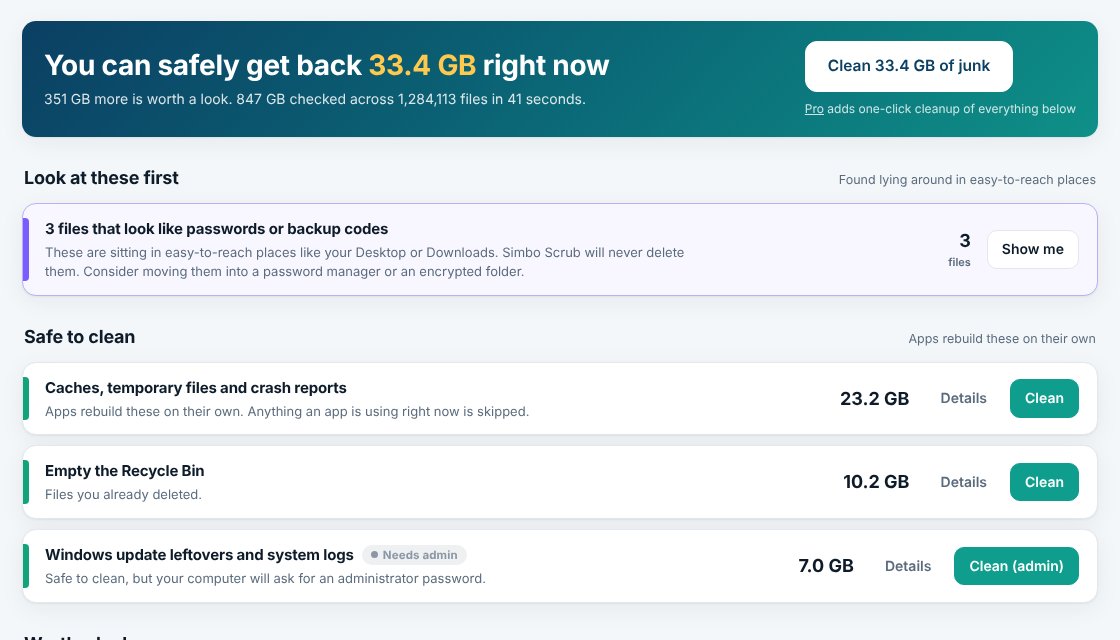
Zero value, safe to clear. Caches, temporary files and crash reports that apps rebuild on their own. Anything in use is skipped.
- An undo for everything personal. Removed items wait in the Safe Bin (7 days free, 30 with Pro) and go back with one click.
- The space you can't see, explained. Hibernation files, restore points, snapshots and macOS itself are shown and explained in plain words, with the exact steps to shrink them.
- Passwords left lying around. Files that look like backup codes or passwords on your Desktop or in Downloads are flagged, never deleted.
- No scare tactics. No fake "your PC is at risk" alarms and no registry cleaning. Just what's on your disk and what it's worth.
Get space back without deleting anything
Often the best cleanup isn't deleting at all.
- Edited and trimmed copies, found. Spots the recolored photo, the resized copy for Instagram and the trimmed clip, and suggests which to keep, with reasons.
- Shrink games and apps in place. Uses the compression built into your disk. They open and play exactly as before, often 20 to 40% smaller.
- Shrink big videos. Re-saves them in the modern HEVC format: same length and resolution, usually about half the size. The original stays in the Safe Bin until you're happy.
- Move to another drive, checked byte for byte. Archive old projects or footage to an external disk. Nothing is removed until every file is verified, and a note shows where it went.
- Cloud files online-only. Files already in OneDrive, iCloud Drive or Dropbox stop taking local space and download again when you open them.
- Knows what's growing. See what grew since your last scan and roughly when your disk will be full at this rate, with alerts before it is.
Private by design
Every scan happens on your computer. File names, sizes and contents never leave it. Your Simbo account only tells the app which plan you have, the same account you use for every Simbo app.